
The Importance of Keyword Analysis in Google Analytics
Keyword analysis is a crucial aspect of any digital marketing strategy, and Google Analytics provides invaluable insights into how users discover your website through search engines. By utilising the keyword analysis feature in Google Analytics, businesses can gain a deeper understanding of their audience’s search behaviour and tailor their content to attract more relevant traffic.
Understanding User Intent
Keywords are the terms that users type into search engines when looking for information, products, or services. By analysing the keywords that drive traffic to your website, you can uncover valuable insights into user intent. Are users searching for informational content, product reviews, or specific services? Understanding user intent allows you to create targeted content that meets the needs of your audience.
Identifying High-Performing Keywords
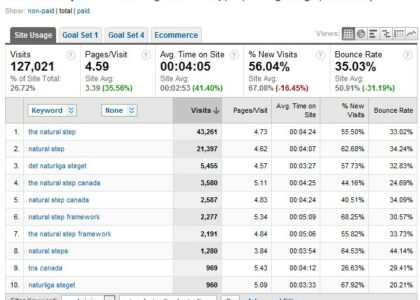
Google Analytics enables businesses to identify high-performing keywords that drive organic traffic to their website. By analysing metrics such as organic search sessions, bounce rates, and conversion rates for specific keywords, businesses can determine which keywords are most effective in attracting engaged visitors who are likely to convert. This data empowers businesses to focus their efforts on optimising content around top-performing keywords.
Optimising Content Strategy
Keyword analysis in Google Analytics plays a key role in shaping a business’s content strategy. By identifying relevant keywords that resonate with your target audience, businesses can create compelling and SEO-friendly content that ranks well in search engine results pages (SERPs). Understanding which keywords drive the most traffic allows businesses to prioritise these terms in their content creation efforts and improve overall visibility online.
Monitoring Performance Over Time
Regular keyword analysis using Google Analytics allows businesses to monitor the performance of their SEO efforts over time. By tracking changes in keyword rankings, organic traffic trends, and user engagement metrics, businesses can adapt their strategies accordingly to maintain or improve their online visibility. Continuous monitoring of keyword performance is essential for staying competitive in an ever-evolving digital landscape.
Conclusion
In conclusion, keyword analysis in Google Analytics is a powerful tool for enhancing your digital marketing strategy. By understanding user intent, identifying high-performing keywords, optimising content strategy, and monitoring performance over time, businesses can improve their online visibility and attract more qualified leads. Leveraging the insights provided by keyword analysis empowers businesses to make data-driven decisions that drive success in today’s competitive online environment.
Comprehensive Guide: Frequently Asked Questions on Keyword Analysis and Google Analytics
- How do you perform keyword analysis?
- Can Google Analytics track keywords?
- What is keyword analysis?
- What is Google keyword analytics?
- What is keywords analysis?
- How do you run a keyword analysis?
- Does Google have a keyword research tool?
- How to check keywords in Google Analytics?
How do you perform keyword analysis?
Performing keyword analysis in Google Analytics involves several key steps to gain valuable insights into user search behaviour. Firstly, access the ‘Queries’ report in Google Analytics to view the keywords that users are using to find your website. Analyse metrics such as click-through rates, bounce rates, and conversions associated with these keywords to identify high-performing terms. Utilise tools like Google Keyword Planner or SEMrush to expand your keyword research and discover relevant terms that align with your business goals. By understanding user intent, monitoring keyword performance, and optimising your content strategy around top-performing keywords, you can enhance your digital marketing efforts and attract more qualified traffic to your website.
Can Google Analytics track keywords?
Yes, Google Analytics can track keywords used by visitors to reach your website through organic search. While Google no longer provides the full set of keyword data due to privacy reasons and the increase in encrypted search (HTTPS), Google Analytics still offers valuable insights into the keywords that drive organic traffic to your site. By analysing the available keyword data in Google Analytics, businesses can gain a better understanding of how users discover their website and optimise their content strategy to improve visibility and attract relevant traffic.
What is keyword analysis?
Keyword analysis is a fundamental aspect of digital marketing that involves examining the specific words and phrases users enter into search engines to find relevant information, products, or services. In the context of Google Analytics, keyword analysis refers to the process of evaluating the performance and impact of these keywords on a website’s organic search traffic. By understanding what keywords drive user engagement and conversions, businesses can tailor their content strategy to better align with user intent and improve their overall visibility in search engine results. Keyword analysis in Google Analytics provides valuable insights that help businesses refine their SEO efforts and create targeted content that resonates with their target audience.
What is Google keyword analytics?
Google keyword analytics in Google Analytics refers to the process of analysing the keywords that users enter into search engines to discover a website. This feature provides valuable insights into user behaviour, allowing businesses to understand how users find their site and what they are searching for. By examining the performance of specific keywords in terms of organic search sessions, bounce rates, and conversion rates, businesses can identify which keywords are driving the most relevant traffic. Google keyword analytics enables businesses to optimise their content strategy by focusing on high-performing keywords that attract engaged visitors and improve overall visibility in search engine results pages.
What is keywords analysis?
Keyword analysis, also known as keyword research, is a fundamental practice in digital marketing that involves identifying and evaluating the specific terms or phrases that users enter into search engines to find information, products, or services. In the context of Google Analytics, keyword analysis refers to the process of examining the keywords that drive traffic to a website and understanding their impact on user behaviour and website performance. By conducting keyword analysis in Google Analytics, businesses can gain valuable insights into user intent, identify high-performing keywords, optimise their content strategy, and track the effectiveness of their SEO efforts over time. This data-driven approach enables businesses to create targeted content that resonates with their target audience and improves their online visibility.
How do you run a keyword analysis?
Running a keyword analysis in Google Analytics involves several key steps to gain valuable insights into user search behaviour and optimise content strategy. Firstly, navigate to the ‘Acquisition’ tab and select ‘All Traffic’ followed by ‘Channels’ to view organic search data. Next, access the ‘Queries’ report under the ‘Search Console’ section to analyse specific keywords driving traffic to your website. Pay attention to metrics such as click-through rates, average positions, and impressions to identify high-performing keywords. Utilise filters and segmentation options to refine your analysis further and uncover patterns in user search intent. By regularly running keyword analyses and adapting your content strategy based on the insights gained, you can enhance your website’s visibility and attract more relevant traffic.
Does Google have a keyword research tool?
When it comes to keyword research, Google offers a powerful tool known as Google Keyword Planner. This tool is part of Google Ads and provides valuable insights into search volume, competition levels, and suggested bid prices for specific keywords. By using Google Keyword Planner, businesses can discover new keyword opportunities, refine their SEO strategies, and identify relevant terms to target in their content. Overall, Google Keyword Planner is a valuable resource for conducting keyword research and optimising digital marketing campaigns effectively.
How to check keywords in Google Analytics?
To check keywords in Google Analytics, navigate to the ‘Acquisition’ section and select ‘All Traffic’ followed by ‘Channels’. From there, click on ‘Organic Search’ to view the organic search traffic data. Next, click on ‘Secondary Dimension’ and choose ‘Acquisition’ > ‘Keyword’. This will display the keywords that users are using to find your website through organic search. By analysing this keyword data, businesses can gain valuable insights into user search behaviour and tailor their content strategy to attract more relevant traffic. Regularly monitoring and analysing keywords in Google Analytics is essential for optimising SEO efforts and improving overall online visibility.