Website Keyword Analysis: A Practical Guide
Website keyword analysis is the process of examining the words and phrases people use when searching online, then assessing how well a website meets those needs. It helps businesses understand what their audience is looking for, identify opportunities to improve existing pages and plan useful new content.
Effective analysis goes beyond collecting popular search terms. It considers the purpose behind each search, the competition for visibility and the pages most likely to provide a helpful answer.
Why analyse website keywords?
Keyword analysis can help you:
- Understand the questions and needs of your target audience
- Improve the relevance of existing website pages
- Find topics for articles, guides and service pages
- Identify gaps in your content compared with competitors
- Prioritise SEO work based on potential value
It can also reveal whether a page is attracting the right visitors. High traffic is not necessarily useful if visitors are looking for something the page does not offer.
Start with your audience and objectives
Before looking at keyword data, consider who you want to reach and what you want them to do. Are you aiming to attract people researching a problem, comparing suppliers or ready to make a purchase? A clear objective helps you judge whether a keyword is relevant to your business.
Think about the language your customers use, including common questions, alternative names for your products or services, and the problems they are trying to solve. Customer enquiries, sales conversations and support requests can all provide useful ideas.
Find relevant search terms
Build an initial list of topics related to your products, services and expertise. Expand it using sources such as:
- Search suggestions and related searches
- Questions customers frequently ask
- Your website’s internal search data
- Search performance reports, where available
- Keyword research tools
- Competitor websites and content
Include specific phrases as well as broad terms. A broad search such as “accounting software” may have many competing results, while a more detailed phrase such as “accounting software for small construction firms” may show clearer intent. Longer searches often have lower search volumes, but they can be more closely connected to a particular need.
Understand search intent
Search intent is the likely reason behind a query. It is commonly grouped into four types:
- Informational: the searcher wants to learn or find an answer
- Navigational: the searcher is looking for a particular website or page
- Commercial investigation: the searcher is comparing options before making a decision
- Transactional: the searcher is ready to take an action, such as buying or booking
Look at the results that currently appear for a term. If they are mostly guides, a product page may not be the best match. If they are comparison pages or service listings, an informational article may not meet the searcher’s expectations. The format and purpose of your page should reflect the intent behind the query.
Assess keyword opportunity
Useful metrics can help you compare terms, but they should not be considered in isolation. Depending on the tools available, you may review:
- Search volume: an estimate of how often people search for a term
- Competition or difficulty: an estimate of how challenging it may be to rank
- Relevance: how closely the query relates to your offer and audience
- Business value: the likelihood that visitors could become customers
- Current performance: whether your site already receives impressions or visits for the term
Search-volume figures are estimates, not guarantees of traffic. A lower-volume phrase can be a better opportunity if it is highly relevant and matches a clear customer need. Similarly, a competitive term may still be worth targeting when it is central to your business and you can create a particularly useful page.
Map keywords to website pages
Once you have a shortlist, group related terms by topic and intent. Then decide which existing or new page should serve each group. This is known as keyword mapping.
As a general guide, give each page one clear primary topic and support it with closely related phrases. Avoid creating several pages that all target almost the same query. These pages may compete with one another and make it less clear which one should appear in search results.
A simple mapping table might include:
- Target topic or primary phrase
- Related searches and questions
- Search intent
- Relevant page URL
- Recommended action, such as updating or creating a page
Optimise pages naturally
Use your analysis to make pages more useful, not to insert keywords wherever possible. Include relevant terms naturally in the page title, main heading, introductory copy and subheadings where they help describe the content. Page addresses, image descriptions and meta descriptions can also be reviewed, where appropriate.
The most important consideration is whether the page answers the visitor’s question clearly and completely. Avoid keyword stuffing, awkward repetition and content written only to influence search rankings. These practices can make pages harder to read and may weaken the quality of the experience.
Review results and update your analysis
Keyword analysis is not a one-off task. Search behaviour, competitors and your own business priorities can change over time. Review performance periodically using analytics and search performance tools. Look at impressions, clicks, click-through rate, rankings and the actions visitors take on your website.
If a page receives impressions but few clicks, its title and description may not be compelling or may not reflect the query. If it attracts visits but produces little engagement, check whether the content meets the searcher’s expectations and offers a clear next step. Use these findings to refine the page rather than making changes based on rankings alone.
Common mistakes to avoid
- Choosing keywords solely because they have high search volumes
- Ignoring the intent behind a search
- Targeting too many unrelated topics on one page
- Creating multiple pages for nearly identical searches
- Repeating keywords unnaturally
- Failing to review performance after publishing or updating content
Conclusion
Website keyword analysis helps connect what people search for with the information and services your website provides. By combining audience knowledge, search intent, relevant data and careful page planning, you can make more informed decisions about SEO and content. The strongest approach is to focus on useful pages that satisfy real needs, then use performance data to keep improving them.
Website Keyword Analysis: 9 Frequently Asked Questions
- What is website keyword analysis?
- Why is keyword analysis important for a website?
- How do I find the right keywords for my website?
- Which tools can I use for website keyword analysis?
- How do I assess keyword search volume and competition?
- What is search intent, and how does it affect keyword research?
- How many keywords should I target on each website page?
- How often should I review and update my website keywords?
- How can I measure the success of my website keyword analysis?
What is website keyword analysis?
Website keyword analysis is the process of researching and assessing the words and phrases people use in search engines to find information, products or services. It helps you understand what your audience is looking for, the intent behind their searches and how competitive particular terms may be. These insights can guide your website content, helping you improve relevant pages and create useful new content that better meets visitors’ needs.
Why is keyword analysis important for a website?
Keyword analysis is important because it shows how people search for the products, services and information your website offers. By understanding the terms they use and the intent behind them, you can create and improve pages that better answer their needs, attract more relevant visitors and support your business goals. It also helps identify content gaps and opportunities to improve your visibility in search results.
How do I find the right keywords for my website?
To find the right keywords for your website, start by identifying your audience, what they need and the products or services you offer. Brainstorm the words and questions customers might use, then expand your list with search suggestions, keyword research tools and data from your website’s search performance. Assess each phrase for relevance, search intent, competition and potential business value—not just search volume. Finally, group related terms by topic and match them to the most appropriate pages, creating useful content that answers what people are actually looking for.
Which tools can I use for website keyword analysis?
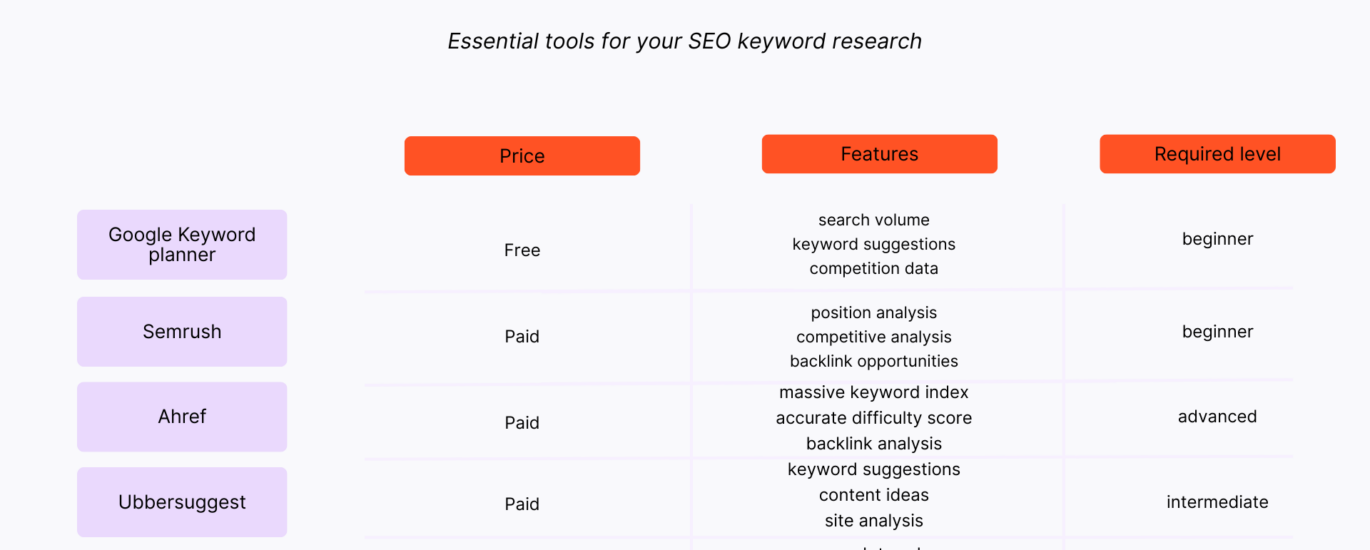
You can use a combination of tools for website keyword analysis. Google Search Console shows the queries that already bring impressions and clicks to your site, while Google Keyword Planner can help you discover related terms and estimate search volumes. Tools such as Ahrefs, Semrush and Moz offer keyword, competitor and ranking research, and Google Trends can help you explore changes in interest over time. Free options, including search suggestions and the “People also ask” results on Google, can reveal common questions. Choose tools that suit your budget and goals, and treat their figures as estimates rather than guarantees.
How do I assess keyword search volume and competition?
To assess keyword search volume and competition, use an SEO keyword research tool to compare estimated monthly searches with a keyword difficulty or competition score. Treat these figures as guides rather than guarantees, as estimates vary between tools and industries. Consider search intent and relevance too: a lower-volume phrase with clear commercial intent may be more valuable than a popular, broad term. Finally, review the current search results to see which types of pages rank and how authoritative or useful they are, then prioritise keywords that match your audience and that your website can realistically target.
What is search intent, and how does it affect keyword research?
Search intent is the reason behind a person’s search: they may want to learn something, find a particular website, compare options or take an action such as making a purchase. Understanding intent helps you choose keywords that are relevant to your audience and create pages that meet their needs. For example, an informational search is usually best served by a helpful guide, while a transactional search may call for a clear product or service page. Matching content to intent can improve its usefulness and its chances of performing well in search results.
How many keywords should I target on each website page?
There’s no fixed number of keywords to target on each page. Focus on one primary topic or search intent, then include a few closely related terms and questions naturally where they help make the content complete. Avoid trying to fit in a long list of keywords or creating separate pages for minor variations of the same query. The aim is to give visitors a clear, useful answer while making the page’s subject easy for search engines to understand.
How often should I review and update my website keywords?
Review your website keywords at least every three to six months, and whenever you make significant changes to your products, services or business priorities. Search trends, competitors and customer needs can shift over time, so use performance data—such as impressions, clicks and conversions—to spot opportunities. If a page’s visibility or relevance declines, reassess its target keywords and update the content to better match what people are searching for.
How can I measure the success of my website keyword analysis?
Measure the success of your website keyword analysis by tracking whether your chosen terms bring more relevant visitors and support your business goals. Use tools such as Google Search Console and web analytics to monitor impressions, clicks, click-through rates, rankings, organic traffic and conversions, comparing results with a baseline over time. Look beyond rankings alone: assess whether visitors engage with your pages, complete desired actions or make enquiries. Review the data regularly, as search behaviour and performance can change, and refine your keyword choices and content where needed.