Website Analyzer Online: How to Evaluate and Improve Your Website
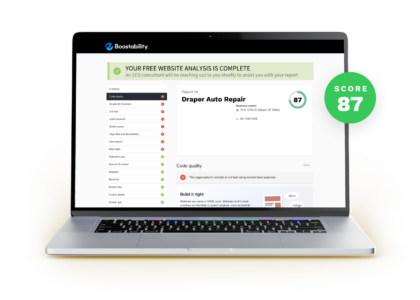
A website analyzer online can help you understand how well your site performs and where it could be improved. By checking factors such as loading speed, mobile usability, accessibility, search engine optimisation and security, an online analysis tool can turn technical details into practical next steps.
Whether you manage a small business website, an online shop or a personal blog, regular analysis can help you spot problems before they affect your visitors. Here’s what these tools can check and how to make their results useful.
What is an online website analyzer?
An online website analyzer is a tool that reviews a web page or site and reports on selected performance and quality indicators. Depending on the tool, you may be able to enter a URL and receive a report within seconds, without installing software.
Some analyzers focus on one area, such as page speed or SEO. Others provide a broader review, combining several checks in one report. The results may include scores, warnings and recommendations, but the exact checks and terminology vary between providers.
What can a website analyzer check?
Page speed and performance
Slow pages can frustrate visitors, particularly on mobile connections. Performance checks may identify large image files, render-blocking scripts, excessive code or other factors that delay loading. A report can help you prioritise improvements, although results may vary depending on the device, network and location used for testing.
Mobile usability
Many people visit websites on phones and tablets. A mobile-friendly page should be readable and easy to use on a smaller screen, with clear navigation, appropriately sized text and buttons that are easy to tap. An analyzer may flag layout issues, but it is still worth testing the site on real devices.
Search engine optimisation
SEO checks can review elements such as page titles, meta descriptions, headings, image alternative text, links and indexability. These checks can reveal missing or unclear information that may make pages harder for search engines and people to understand.
An analyzer cannot guarantee higher rankings. Search visibility depends on many factors, including the usefulness of your content, your site’s reputation and how well your pages meet visitors’ needs.
Accessibility
Accessibility checks may highlight issues such as poor colour contrast, missing labels or images without alternative text. Automated tests can catch some common barriers, but they cannot assess every aspect of the experience. Manual checks, including keyboard navigation and review by people with different access needs, remain important.
Security and technical setup
Some tools check for HTTPS, security-related headers, broken links, redirects or other technical problems. These checks can provide useful pointers, but they are not a complete security audit. Sensitive or business-critical websites may need a more thorough assessment by a qualified specialist.
How to use an online website analyzer
- Choose the right type of tool. Decide whether you need a quick overview or a focused review of speed, SEO, accessibility or security.
- Enter the page URL. Start with an important page, such as your homepage or a key product or service page.
- Review the findings. Look beyond the overall score and read the individual recommendations.
- Prioritise changes. Address issues that affect visitors or prevent important pages from working properly first.
- Make one set of changes at a time. This makes it easier to see whether an improvement has had the intended effect.
- Test again. Re-run the analysis and check the site yourself on different devices and browsers.
How to interpret the results
A score is a useful starting point, not a complete measure of website quality. Two tools may give different results because they use different testing methods, conditions and scoring systems. A low score does not necessarily mean that your site is failing, and a high score does not guarantee that visitors will find it clear or useful.
Give attention to recommendations that are specific and relevant to your site. For example, compressing oversized images may improve loading time, while rewriting a vague page title may make the page’s purpose clearer. Avoid making changes simply to chase a perfect score if they do not benefit visitors or support your goals.
Benefits and limitations
An online website analyzer can save time, help you spot overlooked issues and provide a practical checklist for improvements. It can also be useful for comparing pages or tracking changes over time.
However, automated tools have limitations. They may miss problems, produce false alarms or offer recommendations that do not suit your website. They cannot fully understand your audience, assess the quality of your content or replace professional judgement. Use the report alongside real user feedback and your own testing.
Make website analysis part of regular maintenance
Websites change as content, software and design are updated, so it is worth reviewing important pages periodically and after significant changes. Keep a record of key issues, fixes and results to help guide future work.
Used thoughtfully, a website analyzer online can make website improvement more manageable. It helps you identify potential problems, decide what to tackle first and build a better experience for the people who visit your site.
Top 6 Tips for Using Online Website Analysers Effectively
- Check page speed on desktop and mobile.
- Review SEO titles, headings and meta descriptions.
- Test accessibility with automated tools.
- Scan for broken links and missing images.
- Compare results across multiple analyzers.
- Retest after making changes.
Check page speed on desktop and mobile.
Check your page speed on both desktop and mobile, as a page that loads quickly on a computer may be slower on a phone, especially over a mobile connection. Use a website analyzer to compare results and identify issues such as large images or scripts that delay loading. Improving speed across devices can make your site easier to use and help visitors find what they need without waiting.
Review SEO titles, headings and meta descriptions.
Review your SEO titles, headings and meta descriptions to make sure they accurately describe each page and reflect what visitors are looking for. An online website analyser can flag missing, duplicated or overly long elements, but use its suggestions as a guide rather than a rulebook. Keep titles and descriptions clear and specific, organise headings in a logical order, and write for people first so they can quickly understand what the page offers.
Test accessibility with automated tools.
Use automated accessibility tools to check your website for common issues, such as low colour contrast, missing image descriptions and form fields without labels. These tools can quickly highlight areas that may make your site harder to use, but they cannot identify every barrier or replace real-world testing. Treat their results as a starting point, then check keyboard navigation and, where possible, gather feedback from people with different access needs.
Scan for broken links and missing images.
Use an online website analyser to scan for broken links and missing images, which can frustrate visitors and make your site feel neglected. Check any reported issues, update outdated URLs, restore or replace missing files, and remove links that are no longer relevant. Pay particular attention to key pages, such as contact, product and booking pages, and run another scan after making changes to confirm everything works as expected.
Compare results across multiple analyzers.
Compare results across multiple website analyzers to build a more balanced picture of your site’s performance. Each tool uses different tests and scoring methods, so one may highlight issues another misses—or flag recommendations that are not relevant to your website. Look for recurring findings, prioritise those that affect visitors or important business goals, and treat individual scores as guidance rather than a definitive verdict.
Retest after making changes.
After making changes to your website, run the analyzer again to check whether the issue has been resolved and to spot any new problems. Compare the latest results with your earlier report, then test the page on different devices and browsers. This helps confirm that the changes have improved the site without affecting other parts of the visitor experience.