SEO Check Free: How to Review Your Website’s Search Performance
A free SEO check can help you spot issues that may be making it harder for search engines to understand your website—or for visitors to find what they need. You do not have to pay for a specialist tool to begin. A few reliable free resources and a simple review can reveal useful opportunities to improve your site.
However, no single “SEO check free” tool can assess every aspect of your website or guarantee better rankings. Use the results as a starting point, then prioritise fixes that improve the experience for both people and search engines.
What does a free SEO check look at?
An SEO check is a review of factors that can affect how a website is crawled, indexed and presented in search results. Depending on the tool, it may assess:
- Technical SEO: whether pages can be crawled and indexed, and whether the site has broken links or other technical errors.
- On-page SEO: page titles, headings, meta descriptions, image descriptions and the relevance of page content.
- Mobile usability: how well pages work on phones and tablets.
- Page experience: loading speed, responsiveness and visual stability.
- Search visibility: the queries, pages and locations bringing visitors from search.
- Structured data: whether eligible pages use suitable markup to help search engines interpret their content.
Useful free SEO tools
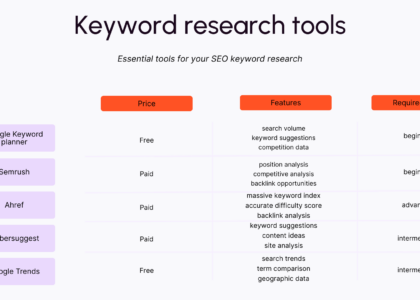
Start with tools that provide information directly from search engines or measure specific aspects of your site:
- Google Search Console: shows how your site performs in Google Search and reports issues such as indexing problems. It can also help you see which search queries bring people to your pages.
- Google PageSpeed Insights: reports on page performance for mobile and desktop, with suggestions for improvement. Results can vary by page and over time.
- Google’s Rich Results Test: checks whether supported structured data on a page is eligible for rich results. Passing the test does not guarantee that a rich result will appear.
- Your browser’s developer tools: can help you inspect page titles, headings, links, image descriptions and how a page behaves on different screen sizes.
- Bing Webmaster Tools: offers search performance information and site diagnostics for Bing.
Some SEO platforms also offer limited free audits. These can be useful for discovering issues quickly, but free plans may restrict how many pages you can check or how often you can run a report. Review the tool’s terms and avoid granting access to accounts or data unless you understand what permissions it needs.
How to carry out a basic SEO check
Check whether important pages are indexed
Make sure your key pages can be found by search engines. Search Console can report indexing issues and show which pages Google has processed. Check that important pages are not accidentally blocked by your robots.txt file or marked with a “noindex” instruction.
Not every page needs to appear in search results. For example, private account pages or duplicate versions of a page may not belong in the index. Focus on the pages that genuinely help prospective customers or readers.
Review page titles and descriptions
Each important page should have a clear, descriptive title that accurately reflects its content. Write a useful meta description to encourage the right people to visit, but remember that search engines may choose a different description for the results page.
Avoid repeating the same title across many pages or cramming titles with keywords. Clarity and relevance matter more than trying to include every possible search term.
Make content easy to understand
Check that each page has a clear subject and answers the questions visitors are likely to have. Use headings to organise the information, explain specialist terms and keep paragraphs focused. Content should be accurate, original and written for people—not created simply to repeat keywords.
Where it helps the reader, link to related pages on your site. Also check that important pages can be reached through your navigation and that links use meaningful wording.
Test mobile usability and speed
Open your website on a phone and try the main tasks a visitor might want to complete. Text should be readable, buttons should be easy to use and the layout should not require awkward horizontal scrolling.
Use PageSpeed Insights to identify possible performance improvements. Common areas to investigate include oversized images, unnecessary scripts and slow server responses. Treat performance reports as diagnostic guidance: a high score alone does not guarantee a good user experience or improved rankings.
Look for broken links and missing image descriptions
Test important links and fix any that lead to error pages. Images that convey information should have concise, accurate alt text so their content can be understood by people using assistive technology. Decorative images can usually have empty alt text instead of a written description.
Check the results over time
Search performance changes gradually. Record a baseline in Search Console, then monitor impressions, clicks, average position and the pages that attract visitors. If you make a change, allow time for search engines to recrawl the page before judging its effect.
What can a free SEO check not tell you?
A free audit is a useful introduction, but it has limitations. A tool may only examine a sample of your pages, miss issues that need human judgement or flag recommendations that are not relevant to your business. It also cannot promise a particular ranking, traffic level or date for results.
SEO depends on more than technical health. The usefulness of your content, the competition for relevant searches, your site’s reputation and the needs of your audience all matter. Use automated reports to find clues, then verify each issue before making changes.
When should you consider professional help?
If your website has thousands of pages, has recently lost significant search visibility, or relies on organic search for a large share of its business, a more detailed review may be worthwhile. A professional can investigate complex technical problems, content priorities and how your site compares with competitors.
For a smaller site, a regular free SEO check is a practical way to keep the basics in order. Start with your most important pages, fix clear errors and focus on making the site genuinely useful to its visitors.
Final thoughts
An SEO check free of charge can provide a valuable first look at your website’s health and search performance. Use trustworthy tools, check issues manually and prioritise improvements that make pages clearer, faster and easier to use. Consistent, thoughtful work is more helpful than chasing a perfect score from any single audit.
6 Free SEO Checks to Improve Your Website
- Use free tools to check page titles and meta descriptions.
- Test your site’s mobile-friendliness.
- Check loading speed with a free page-speed tool.
- Find broken links and fix them.
- Review headings and use clear keywords naturally.
- Check that your pages are indexed by Google.
Use free tools to check page titles and meta descriptions.
Use free SEO tools to review the page titles and meta descriptions on your website. Check that each important page has a unique, clear title and a concise description that accurately reflects its content and encourages the right visitors to click. These tools can flag missing or duplicate details, but treat their suggestions as a starting point and make sure the wording reads naturally for people.
Test your site’s mobile-friendliness.
Test your site’s mobile-friendliness by opening key pages on a smartphone and checking that text is easy to read, buttons and links are simple to tap, and content fits the screen without horizontal scrolling. You can also use Google Search Console or PageSpeed Insights to identify potential mobile usability and performance issues. A site that works well on mobile makes it easier for visitors to find information and complete tasks, while helping search engines understand the quality of the page experience.
Check loading speed with a free page-speed tool.
Check your website’s loading speed with a free page-speed tool, such as Google PageSpeed Insights. Test important pages on both mobile and desktop, then review the suggestions for improvements—for example, compressing large images or reducing unnecessary scripts. Faster-loading pages can make your site easier to use, particularly on mobile devices, although a tool’s score is only a guide and does not guarantee higher search rankings.
Find broken links and fix them.
Finding and fixing broken links is a simple but valuable part of a free SEO check. Links that lead to missing pages can frustrate visitors and make it harder for search engines to explore your site. Check important internal and external links regularly, update them when a page has moved, or remove them if the destination is no longer available. Where appropriate, redirect a deleted page to the most relevant alternative.
Review headings and use clear keywords naturally.
Review your headings to make sure they clearly describe each section and help readers find the information they need. Use relevant keywords naturally where they fit, rather than forcing them into every heading. A clear structure—with one main heading followed by logical subheadings—can make your content easier to read and help search engines understand what each page is about.
Check that your pages are indexed by Google.
Check that your important pages are indexed by Google so they have the opportunity to appear in search results. Use Google Search Console’s Page Indexing report to see which pages are indexed and whether any have been excluded or encountered errors. If a page you want people to find is missing, check for issues such as a “noindex” instruction, a blocked URL or a missing internal link, then request indexing once you have addressed the problem.