Website Competitor Analysis: A Practical Guide
A website competitor analysis helps you understand how other businesses attract, engage and convert visitors online. By examining their websites, content and customer journeys, you can spot opportunities to improve your own site and make more informed decisions about your digital strategy.
The aim is not to copy competitors. It is to learn what works in your market, identify gaps and create a website that better serves your audience.
What Is Website Competitor Analysis?
Website competitor analysis is the process of reviewing competing businesses’ websites and comparing them with your own. It can cover everything from search visibility and page content to site structure, user experience and calls to action.
A useful analysis looks beyond appearance. A polished website may still be difficult to navigate or fail to explain its products clearly. The key is to consider how well each site meets customer needs and supports business goals.
Why Analyse Competitor Websites?
Regular analysis can help you:
- Understand what customers are likely to expect from websites in your sector.
- Find topics and search terms your own content may be missing.
- Identify strengths and weaknesses in your website’s user experience.
- See how competitors explain their products, services and points of difference.
- Discover opportunities to stand out rather than follow the crowd.
Choose the Right Competitors
Start by identifying a manageable group of businesses to review. Direct competitors offer similar products or services to the same audience. Indirect competitors may solve the same customer problem in a different way. It can also be useful to include an aspirational business with a particularly strong website, even if it is not a direct rival.
Search for the products or services your customers are likely to look for, and note which businesses appear consistently. Consider your target locations, customer types and price range when deciding which websites are relevant.
What to Assess
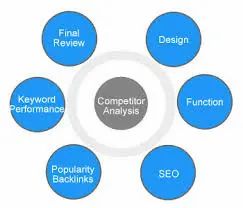
Website structure and navigation
Look at how each website organises its information. Are important pages easy to find? Are menus clear on both desktop and mobile? Note how the site guides visitors from a general overview to specific product or service details.
Content and messaging
Review the language used across key pages. Check whether the website explains what the business offers, who it serves and why customers might choose it. Look at product or service pages, FAQs, case studies, blog articles and other resources.
Pay attention to whether the content answers common customer questions. Clear, useful information can help visitors make decisions and reduce uncertainty.
Search visibility
Consider which pages appear in search results for relevant terms. You can compare the topics competitors cover, the wording of their page titles and descriptions, and the questions their content addresses.
Search visibility tools can provide estimates of keywords and traffic, but these figures are not exact. Use them to generate ideas and patterns rather than treating them as a complete picture.
User experience and accessibility
Test the website as a visitor would. Is it easy to read and use? Does it work well on a mobile phone? Are forms straightforward? Check for clear headings, readable text, descriptive links and accessible colour contrast. Page speed and usability can also influence how easily visitors complete tasks.
Calls to action and conversion paths
Identify what each site encourages visitors to do: make an enquiry, request a quote, book a demonstration, make a purchase or sign up for updates. Follow the steps leading to that action and note where the process feels clear or confusing.
Competitors’ conversion journeys can offer useful ideas, but the best approach for your website will depend on your audience and business model.
A Simple Competitor Analysis Process
- Set a goal. Decide what you want to improve, such as search performance, enquiries or product-page clarity.
- Select your competitors. Choose a small group of direct and indirect competitors that serve a similar audience.
- Review the same areas. Use a consistent checklist for every website so your comparison is fair.
- Record observations. Separate what you can see from assumptions about why a competitor has made a particular choice.
- Identify gaps and opportunities. Look for customer needs that are not being addressed well across the market.
- Prioritise actions. Focus first on changes that are valuable to your audience and practical for your team to deliver.
- Measure the results. Track relevant indicators after making changes, then review and refine your approach.
Tools That Can Help
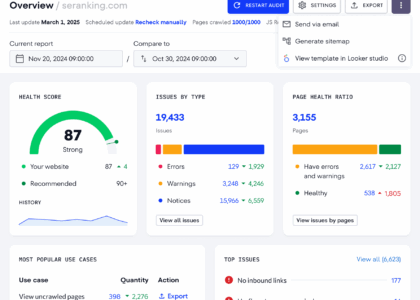
A combination of manual review and digital tools is often most useful. Web analytics can show how visitors behave on your own site. Search tools can help you explore rankings and search queries, while page-speed and accessibility checkers can highlight technical issues. Website crawlers can also help you compare page structures and identify broken links.
Tools provide evidence, not answers. Automated reports may miss context, and competitor data is often estimated. Use the findings alongside direct observation and knowledge of your customers.
Common Mistakes to Avoid
- Copying competitors. A tactic that works for another business may not suit your customers or brand.
- Focusing only on design. Visual presentation matters, but content, usability and technical performance matter too.
- Trying to track everything. A focused review tied to clear goals is more useful than a large collection of irrelevant data.
- Assuming correlation is proof. A competitor’s strong search presence does not necessarily mean one specific feature caused it.
- Ignoring your own performance. Competitor insights should be compared with your analytics, customer feedback and business priorities.
Turn Findings into Action
A competitor analysis is valuable only when it leads to decisions. Summarise the most important findings, then turn them into a prioritised action plan. This might include improving a service page, creating content that answers an unanswered customer question, simplifying navigation or making a key call to action more prominent.
Website competitor analysis should be an ongoing process rather than a one-off exercise. Markets, customer expectations and search results change over time. Reviewing your site and its competitors regularly can help you stay relevant, make better decisions and build a website that gives visitors a clearer reason to choose your business.
Essential FAQs for Conducting Effective Website Competitor Analysis
- How do I compare my website to competitors?
- How do you perform a competitor analysis?
- What is the best SEO tool for competitor site analysis?
- How do you analyze a competitor website?
- What elements should you Analyse on your competitors website?
- How do you analyze a website competitor?
- How do you analyze competitors website SEO?
How do I compare my website to competitors?
To compare your website with competitors, choose a few businesses targeting a similar audience and review the same areas on each site: content, navigation, mobile usability, page speed, search visibility and calls to action. Note what they do well, where their websites fall short and which customer needs appear to be overlooked. Use tools such as web analytics and search-performance platforms to add evidence, but focus on practical improvements that suit your own customers and business goals rather than copying competitors.
How do you perform a competitor analysis?
To perform a competitor analysis, identify businesses that target a similar audience, then compare their websites against yours. Review their content, services, navigation, user experience, search visibility and calls to action. Note what they do well, where they fall short and which customer needs remain unmet. Use these findings to prioritise practical improvements to your own website, and measure the results over time.
What is the best SEO tool for competitor site analysis?
There’s no single best SEO tool for competitor site analysis, as the right choice depends on your goals and budget. Platforms such as Ahrefs, Semrush and Similarweb can help you explore competitors’ search visibility, keywords, backlinks and estimated traffic. Treat these figures as useful estimates rather than exact data, and combine them with a hands-on review of competitors’ content, website structure and user experience.
How do you analyze a competitor website?
To analyse a competitor website, review its structure, navigation, content, messaging, mobile experience and calls to action. Check which pages and topics appear in search results, and consider how clearly the site explains its products or services and guides visitors towards taking action. Compare your findings with your own website, using analytics, customer feedback and relevant tools to identify practical opportunities—not simply to copy what competitors do.
What elements should you Analyse on your competitors website?
When analysing a competitor’s website, look at its structure and navigation, page content and messaging, search visibility, mobile experience, accessibility and page speed. Review how clearly it explains its products or services, what makes it different, and how it uses customer reviews, case studies or other trust signals. Also follow the visitor journey: note where calls to action appear and how easy it is to make an enquiry or purchase. These insights can reveal useful opportunities, but focus on what would best serve your own audience rather than simply copying competitors.
How do you analyze a website competitor?
To analyse a website competitor, start by identifying businesses that target a similar audience, then review their site structure, navigation, content, design, mobile experience and calls to action. Check how easily visitors can find key information and what the site does well—or leaves unclear. You can also compare search visibility, page speed and accessibility using relevant tools, alongside insights from your own website analytics and customer feedback. Record the findings, look for gaps or ideas that could better serve your audience, and prioritise improvements without simply copying what competitors do.
How do you analyze competitors website SEO?
To analyse a competitor’s website SEO, compare how well their pages perform in search for terms relevant to your business. Review the keywords they appear to target, the topics and quality of their content, page titles and descriptions, internal links, site structure, mobile usability and page speed. SEO tools can help estimate rankings, backlinks and organic traffic, but treat these figures as indicators rather than exact data. Use your findings to identify useful content gaps and practical improvements for your own website, rather than simply copying a competitor’s approach.