

SEO Score Checker: What It Measures and How to Use It
An SEO score checker is a tool that reviews a web page or website and gives an indication of how well it follows selected search engine optimisation (SEO) practices. It may assess factors such as page titles, headings, content, links, mobile usability and loading performance.
The score can be a useful starting point, especially when reviewing a new page or carrying out a website audit. However, it is important to understand what the result means: an SEO score is an estimate produced by a particular tool, not a direct measure of how Google or another search engine will rank a page.
What Does an SEO Score Checker Assess?
Different tools use different methods, so the checks and scoring systems can vary. Common areas include:
- On-page elements: page titles, meta descriptions, headings, image alt text and URL structure.
- Content: relevance to the topic, readability, page depth and use of related terms.
- Technical SEO: crawlability, indexability, canonical tags, redirects and structured data.
- Performance: loading speed and other user experience signals, including Core Web Vitals.
- Mobile usability: whether pages are easy to view and use on smaller screens.
- Links: internal links between pages and, in some tools, links from other websites.
- Security: whether the site uses HTTPS and has other basic security measures in place.
Some checkers focus on a single URL, while others examine an entire domain. A page-level report can help with detailed improvements; a site-wide audit is better for spotting repeated or technical issues across many pages.
What Does the Score Actually Mean?
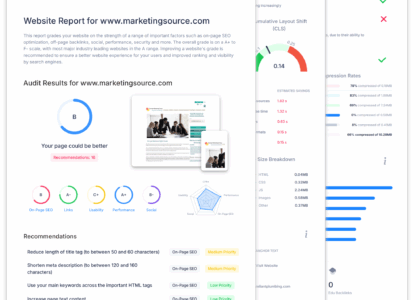
Most SEO checkers combine their findings into a score, often shown as a number, grade or colour-coded rating. The score makes a report easier to scan, but it reflects the tool’s own rules and weightings. Two checkers can give the same page different scores because they assess different factors.
Search engines do not use a third-party checker’s score as a ranking factor. A high score does not guarantee strong rankings, and a lower score does not automatically mean that a page will perform poorly. Search visibility also depends on factors such as the usefulness of the content, the needs of the searcher, competition and the overall quality of the website.
How to Use an SEO Score Checker
- Choose the right page or site. Decide whether you need to review one landing page, a group of important URLs or the whole website.
- Run the check. Enter the page address and allow the tool to crawl or analyse it.
- Review the individual findings. Look beyond the headline score. Check what the tool tested and why it has flagged an issue.
- Prioritise improvements. Address problems that affect visitors or search engines first, such as blocked pages, broken links, missing page titles or poor mobile usability.
- Make changes and test again. Recheck the page after updates, while remembering that search performance may take time to reflect changes.
Which Issues Should You Fix First?
Not every recommendation deserves equal attention. A missing title on an important page is usually more pressing than a minor suggestion to adjust a phrase. Consider the likely impact, the effort involved and the importance of the affected page.
A practical order is to start with:
- Pages that cannot be crawled or indexed as intended.
- Broken pages, redirect loops and important broken internal links.
- Missing or unclear titles and headings on key pages.
- Slow or difficult-to-use pages, particularly on mobile devices.
- Content that does not clearly answer the visitor’s question.
- Opportunities to improve internal links and navigation.
Be cautious with automated recommendations about keyword density or ideal word counts. A useful page should answer the reader’s question clearly and naturally, rather than repeat terms simply to satisfy a tool.
Choosing an SEO Score Checker
Look for a checker that explains its findings in plain language and shows which pages were tested. It should offer actionable recommendations rather than relying on a single score. Depending on your needs, you may also want features such as scheduled crawls, competitor comparisons, exportable reports or checks for Core Web Vitals.
For a fuller picture, use more than one source of information. An SEO checker can help identify potential problems, while analytics and search performance tools can show how visitors find and use your website. Technical checks should also be reviewed alongside the content and purpose of each page.
Common Mistakes to Avoid
- Chasing a perfect score: spending time on minor tool recommendations may not improve the experience for visitors.
- Treating every warning as critical: check whether an issue affects an important page and whether the recommendation is relevant.
- Changing content just to satisfy a tool: prioritise accuracy, clarity and usefulness over arbitrary targets.
- Ignoring the wider site: one page can score well while the website still has navigation, technical or content problems.
- Expecting immediate results: search engines need time to crawl and reassess updated pages, and rankings can change for many reasons.
Final Thoughts
An SEO score checker can make website reviews more manageable by highlighting possible issues and areas for improvement. Its score is best treated as a guide, not a verdict. Use the detailed findings to prioritise practical changes, keep the needs of your visitors in focus and measure progress using real search and website performance data.
SEO Score Checker: 28 Frequently Asked Questions About Website Scores, Rankings and Health
- What is a good SEO score out of 100?
- Does Google have an SEO checker?
- What is SEO checker?
- Is 80 a good SEO score?
- How can I check my SEO score for free?
- How do I get my SEO score?
- How do I check my SEO quality?
- Is SEO score 75% good?
- How to check SEO ranking?
- What is the SEO score of a page?
- How is the SEO score calculated?
- How can I get 100 SEO score?
- What is an SEO score of 90?
- How can I check my website health score?
- Is a 100% SEO score good?
- How can I check my website SEO score?
- How can I check my website SEO score for free?
- What is the SEO score rating?
- How do I find my SEO score?
- What is SEO score of any website?
- What is a good SEO score?
- How do I check my SEO Score on Google?
- How do I check my SEO on Google?
- Where can I check my SEO score?
- What is SEO score?
- How do I check my Google SEO score?
- Is 70 a good SEO score?
- How do I check my SEO content score?
What is a good SEO score out of 100?
There is no universal benchmark for a good SEO score out of 100, as each checker uses its own criteria and weighting. A higher score generally means the page meets more of that tool’s recommendations, but it does not guarantee strong search rankings. Use the score as a guide, review the specific issues reported and prioritise improvements that make your site easier to find, use and understand.
Does Google have an SEO checker?
Google does not offer a single tool that gives your website an overall SEO score. However, Google Search Console can help you monitor how your pages appear in Google Search and identify issues with indexing, mobile usability and search performance. Other Google tools, such as PageSpeed Insights and Lighthouse, can assess page speed and technical aspects of user experience. These tools provide useful data, but they do not guarantee rankings or replace a broader SEO review.
What is SEO checker?
An SEO checker is a tool that analyses a website or individual page for factors that may affect its visibility in search engines. It can highlight issues with page titles, headings, content, links, mobile usability, loading speed and technical settings, then suggest possible improvements. Its findings are a helpful guide rather than a guarantee of better rankings, so review each recommendation in context and prioritise changes that benefit both visitors and search engines.
Is 80 a good SEO score?
An SEO score of 80 is generally a good result, but it is not a universal measure of how well a page will rank. Different SEO score checkers use different criteria, so treat 80 as a helpful guide rather than a guarantee of search performance. Review the individual recommendations, fix any important technical or usability issues, and make sure the page provides useful, relevant content for visitors.
How can I check my SEO score for free?
You can check your SEO score for free by entering your website or page URL into a free online SEO checker. These tools typically review factors such as page titles, headings, mobile usability, loading speed and broken links, then provide a score with suggestions for improvement. Free checks may have limits on the number of pages or reports, and each tool uses its own scoring system, so treat the result as a guide rather than a definitive measure of how your site will rank in search engines.
How do I get my SEO score?
To get your SEO score, enter your website or page URL into an SEO score checker and run the analysis. The tool will review selected factors, such as page titles, content, links, mobile usability and technical setup, then provide a score with recommendations. Scores vary between tools, so use the result as a guide to potential improvements rather than a definitive measure of search rankings.
How do I check my SEO quality?
To check your SEO quality, review how easily search engines can crawl and index your website, and whether your pages answer visitors’ questions clearly. An SEO score checker can highlight issues such as missing page titles, broken links, slow loading times and poor mobile usability. Treat its score as a guide rather than a definitive measure: check the individual recommendations, prioritise changes that improve the experience for visitors, and use search performance data to track progress over time.
Is SEO score 75% good?
An SEO score of 75% can be a reasonable starting point, but whether it is “good” depends on the checker, the issues it has identified and your website’s goals. SEO tools use different scoring systems, and their scores are not direct measures of search rankings. Review the recommendations behind the number, prioritise important technical problems and improvements that help visitors, and track search performance over time rather than aiming for a perfect score alone.
How to check SEO ranking?
To check your SEO ranking, use a search performance tool such as Google Search Console to see which queries bring people to your site and your pages’ average positions in search results. You can also use a rank-tracking tool to monitor selected keywords over time, but remember that rankings can vary by location, device and personalisation. For a useful picture of SEO performance, review ranking data alongside clicks, impressions, organic traffic and conversions rather than relying on one position or score alone.
What is the SEO score of a page?
The SEO score of a page is an estimate of how well it follows selected search engine optimisation best practices. An SEO score checker may assess elements such as the page title, headings, content, links, mobile usability and loading speed. The score can help highlight areas to review, but it is specific to the tool being used and is not a search engine ranking or a guarantee of how the page will perform in search results.
How is the SEO score calculated?
An SEO score is calculated using a tool’s own set of checks and weightings, so results can vary between checkers. These checks may cover on-page elements, such as titles and headings, technical factors, including crawlability and mobile usability, page speed, content and links. The tool combines its findings into a score or grade, but this is only an estimate of how well a page follows selected SEO practices; it is not a search engine ranking or a guarantee of performance.
How can I get 100 SEO score?
Getting a 100 SEO score depends on the checker you use, as each tool applies its own tests and scoring rules, and a perfect score does not guarantee higher search rankings. To improve your result, fix relevant technical issues, make sure important pages can be crawled and indexed, write clear page titles and headings, create useful content that answers visitors’ questions, improve mobile usability and loading speed, and add descriptive links and image alt text where appropriate. Treat the score as a guide rather than a goal: prioritise changes that benefit visitors and your website, rather than following recommendations that do not fit the page.
What is an SEO score of 90?
An SEO score of 90 generally means that a particular checker considers the page or website to follow many of its recommended SEO practices. The exact meaning depends on the tool, as each uses different checks and scoring methods. It is a helpful indication of potential strengths, but it does not guarantee high search rankings; content quality, technical health, competition and user needs all matter too. Review the individual recommendations rather than focusing solely on the score.
How can I check my website health score?
To check your website health score, enter your website address into an SEO audit or website health checker and run a scan. The tool will typically review technical SEO, page content, links, mobile usability and site performance, then provide an overall score alongside suggested fixes. Treat the score as a guide rather than a definitive ranking measure, and prioritise issues that affect whether search engines can access your pages or visitors can use them easily.
Is a 100% SEO score good?
A 100% SEO score can be a positive sign that a page meets the checks used by a particular tool, but it does not guarantee high search rankings or more visitors. SEO score checkers use different criteria, and their results are only a guide. Focus on fixing meaningful issues, creating useful content and making your website easy to use, rather than chasing a perfect score.
How can I check my website SEO score?
To check your website’s SEO score, enter its URL into an SEO score checker and review the report it provides. The tool may assess page titles, meta descriptions, content, links, mobile usability, loading speed and technical issues. Treat the score as a guide rather than a definitive ranking measure, as different tools use different criteria. Focus on the individual recommendations, prioritise issues that affect visitors or search engines, and check your website again after making improvements.
How can I check my website SEO score for free?
You can check your website’s SEO score for free using an online SEO checker: enter your website address and the tool will scan for common issues, such as missing page titles, broken links, mobile usability and page speed. Free tools may limit the number of pages or checks available, and each uses its own scoring method, so treat the result as a guide rather than a definitive ranking measure. Review the recommendations, prioritise issues that affect visitors or search engines, and consider checking key pages with tools such as Google Search Console and PageSpeed Insights as well.
What is the SEO score rating?
An SEO score rating is an estimate of how well a webpage or website follows the optimisation checks used by a particular SEO tool. It may consider factors such as page titles, content, links, mobile usability and loading speed. Because each tool uses its own criteria, the rating is best treated as a guide to possible improvements—not a direct measure of search engine rankings or a guarantee of SEO success.
How do I find my SEO score?
To find your SEO score, enter your website or page URL into an SEO score checker and run an analysis. The tool will review selected factors, such as page titles, content, links, mobile usability and technical setup, then show a score alongside suggested improvements. Scores vary between tools, so use the detailed findings as a guide rather than treating the number as a definitive measure of your search performance.
What is SEO score of any website?
An SEO score is an estimate of how well a website follows selected search engine optimisation best practices, based on the checks used by a particular tool. It may consider factors such as technical setup, page titles, content, mobile usability, loading speed and links. Scores can differ between tools and are not used directly by search engines to determine rankings, so treat the result as a guide to potential improvements rather than a definitive measure of a website’s search performance.
What is a good SEO score?
A good SEO score depends on the checker you use, as each tool assesses pages differently and applies its own scoring system. A high score can suggest that a page follows many recommended SEO practices, but it does not guarantee strong search rankings. Use the score as a guide, review the individual recommendations and prioritise improvements that make your website more useful, accessible and technically sound for visitors and search engines.
How do I check my SEO Score on Google?
Google does not provide a single overall SEO score for a website. To assess how your site performs in Google Search, use Google Search Console to review impressions, clicks, rankings, indexing and Core Web Vitals. You can also check page speed with PageSpeed Insights and test structured data with Google’s Rich Results Test. An SEO score checker can bring several checks together, but treat its score as a guide rather than an official Google ranking measure.
How do I check my SEO on Google?
To check your SEO on Google, set up Google Search Console and verify your website. It shows which pages are indexed, the search queries bringing visitors to your site, and information about clicks, impressions and technical issues. You can also use Google’s PageSpeed Insights to review page performance and mobile experience. For a quick check, search for site:yourdomain.co.uk on Google to see some indexed pages, but remember this isn’t a complete audit. An SEO score checker can highlight potential improvements, while Search Console provides data directly from Google about how your site appears in search.
Where can I check my SEO score?
You can check your SEO score using online SEO audit tools, which analyse a web page or website and highlight areas such as page titles, content, links, mobile usability and technical issues. Enter your website address into a checker to view its report and recommendations. As scoring methods vary between tools, treat the result as a guide rather than a definitive measure of search performance, and review the specific findings to decide what to improve.
What is SEO score?
An SEO score is an estimate of how well a web page or website follows a set of search engine optimisation best practices. SEO score checkers calculate it using factors such as page titles, content, links, mobile usability and site performance. Because each tool uses its own criteria, the score is best treated as a guide to potential improvements—not a direct measure of search rankings or a guarantee of SEO success.
How do I check my Google SEO score?
There isn’t an official Google SEO score, so you can’t check one single number that determines how well your site will rank. Instead, use Google Search Console to review search impressions, clicks, indexing and page experience, and PageSpeed Insights to check performance and Core Web Vitals for individual pages. You can also use an SEO checker to identify issues such as missing titles, broken links or crawlability problems, but treat its score as a guide rather than a Google ranking signal.
Is 70 a good SEO score?
A score of 70 can be a good starting point, but what it means depends on the SEO checker you’re using and the factors it measures. These scores are estimates, not official search engine rankings, so focus on the report’s specific recommendations rather than aiming for a particular number. Prioritise issues that affect crawlability, page quality, usability and performance, then track your website’s search results over time.
How do I check my SEO content score?
To check your SEO content score, enter the page URL or paste your text into an SEO checker that assesses on-page content. Review its recommendations for relevance, readability, headings, title tags, meta description and use of related search terms. Treat the score as a guide rather than a ranking guarantee, as tools use different criteria and search engines do not rely on a single content score.