
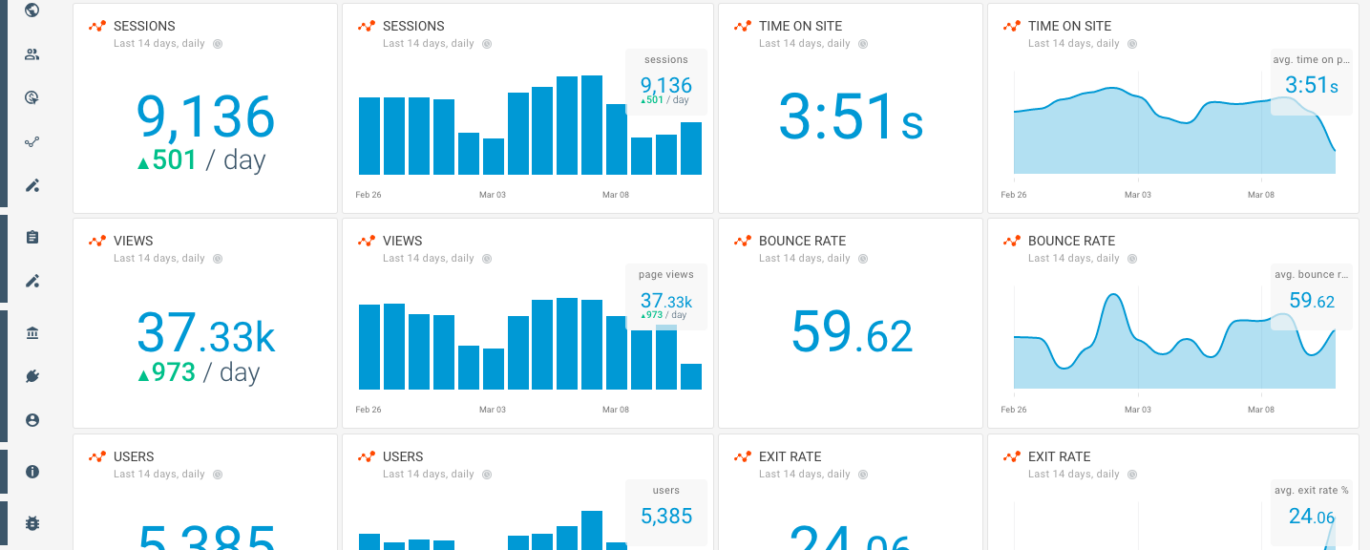
How to Create an Analytics SEO Report That Drives Results
An analytics SEO report brings together data about your website’s visibility in search engines and what visitors do after they arrive. A useful report does more than list figures: it shows what is working, highlights areas that need attention and helps guide your next steps.
Whether you manage your own website or work with an agency, regular reporting can make search engine optimisation (SEO) easier to understand and improve.
What Is an Analytics SEO Report?
An analytics SEO report combines information from tools such as Google Analytics and Google Search Console. Analytics platforms can show how people use your website, while search performance tools reveal how it appears in search results.
Used together, these sources help answer important questions:
- Are more people finding the website through organic search?
- Which search queries and pages are attracting visitors?
- Are visitors taking meaningful actions once they arrive?
- Which pages or technical issues should be prioritised?
Key Metrics to Include
The right metrics depend on your business goals. A clear report usually focuses on a manageable set of measures rather than presenting every available figure.
Organic traffic
Organic traffic refers to visits from unpaid search results. Track the number of organic sessions or users over time, and compare periods carefully. Seasonality, marketing campaigns and changes to your website can all affect traffic.
Search impressions, clicks and click-through rate
Search impressions show how often your pages appeared in search results. Clicks indicate how many people selected them, while click-through rate (CTR) is the proportion of impressions that resulted in a click. A page with many impressions but a low CTR may benefit from a clearer title or a more relevant description.
Search queries and landing pages
Review the queries that lead people to your website and the pages they land on. This can reveal whether your content matches what users are looking for, as well as opportunities to improve or expand useful pages.
Engagement and conversions
Traffic alone does not show whether SEO is contributing to business goals. Depending on your organisation, meaningful actions might include purchases, enquiries, bookings, downloads or newsletter sign-ups. Measure these outcomes alongside traffic to understand the value of organic search.
Technical and indexing information
Include relevant technical checks, such as whether important pages can be indexed, whether mobile pages work properly and whether there are crawl errors. Technical issues can make it harder for search engines and visitors to access your content.
How to Build a Useful Report
- Set a clear objective. Decide what the report needs to help you understand, such as increasing qualified enquiries or improving visibility for a product range.
- Choose relevant metrics. Include measures that relate to the objective. Avoid adding data simply because it is available.
- Use consistent date ranges. Compare like with like, and account for seasonal changes where possible.
- Segment the data. Review performance by landing page, device, location or other useful categories. Segmentation can reveal patterns hidden by overall totals.
- Add context. Note significant changes, such as a website redesign, a new campaign or an update to key pages.
- Turn findings into actions. End with a short list of priorities, owners and review dates.
Common Reporting Mistakes
A report can be technically accurate but still be difficult to act on. Watch out for these common problems:
- Reporting traffic without outcomes: more visits are not necessarily better if they do not reach the right audience or support business goals.
- Relying on rankings alone: search positions can vary, and rankings do not show whether visitors engage or convert.
- Mixing different sources or definitions: tools may measure users and sessions differently, so explain the source of each metric.
- Ignoring context: a sudden rise or fall needs investigation before conclusions are drawn.
- Overloading the report: too many charts and metrics can obscure the most important insights.
From Data to Decisions
The strongest analytics SEO reports connect performance data to practical decisions. For example, if a key page receives search impressions but few clicks, review whether its title and description accurately reflect the content. If organic visits are increasing but enquiries are not, check the page experience, calls to action and relevance of the landing pages.
SEO results often take time, so use regular reporting to look for sustained patterns rather than reacting to every short-term fluctuation. A monthly review may suit many websites, with more frequent checks for major technical issues or active campaigns.
Conclusion
An effective analytics SEO report makes website performance easier to understand and act on. By combining search visibility, visitor behaviour and business outcomes, you can identify opportunities, spot problems and set clearer priorities. Keep the report focused, explain what the data means and make sure every review leads to practical next steps.
7 Tips for Creating an Actionable SEO Analytics Report
- Track organic traffic trends over time.
- Compare clicks, impressions and click-through rates.
- Monitor keyword rankings for priority pages.
- Identify pages with declining organic performance.
- Segment results by device and location.
- Check conversions from organic search.
- Highlight clear actions for the next reporting period.
Track organic traffic trends over time.
Track organic traffic trends over time to understand whether your SEO efforts are improving your website’s visibility and attracting more visitors from unpaid search results. Compare consistent periods, such as month on month or year on year, and take seasonal changes, campaigns and website updates into account. Looking at longer-term patterns rather than reacting to short-term fluctuations will help you identify meaningful growth, spot potential issues and decide where to focus next.
Compare clicks, impressions and click-through rates.
Compare clicks, impressions and click-through rates (CTR) to understand how your pages perform in search results. Impressions show how often a page appears, clicks show how many people visit it, and CTR reveals the proportion of impressions that lead to a click. If a page has plenty of impressions but a low CTR, consider whether its title and description are clear, relevant and compelling. Review these measures over consistent date ranges to spot meaningful changes and assess whether your updates are making a difference.
Monitor keyword rankings for priority pages.
Monitor keyword rankings for your priority pages to see how well they perform for the search terms that matter most to your business. Track changes over time, rather than focusing on day-to-day fluctuations, and compare rankings with impressions, clicks and conversions. If a key page loses visibility, review its content, relevance and technical health; if it gains visibility but attracts few clicks, consider whether its title and description could better match searchers’ needs.
Identify pages with declining organic performance.
Identify pages with declining organic performance by comparing their search traffic, impressions, clicks and conversions over consistent periods. Look for sustained drops rather than short-term fluctuations, then investigate possible causes such as outdated content, stronger competitors, technical issues or changes in search demand. Prioritise pages that are important to your business and decide on practical improvements, such as refreshing the content, updating internal links or resolving indexing problems.
Segment results by device and location.
Segmenting your SEO results by device and location can reveal patterns that overall figures may hide. Compare performance on mobile, tablet and desktop to see whether visitors encounter different experiences or conversion rates, and review results by country, region or city to understand where organic traffic is strongest. These insights can help you prioritise mobile improvements, tailor content to local audiences and focus your SEO efforts where they are most likely to make a difference.
Check conversions from organic search.
Check conversions from organic search to understand whether SEO is contributing to meaningful business results, not just attracting visitors. Track actions such as purchases, enquiry submissions, bookings or newsletter sign-ups, and compare them with organic traffic over time. This can show which landing pages and search queries bring in visitors who are most likely to take action, helping you focus your optimisation efforts where they can have the greatest impact.
Highlight clear actions for the next reporting period.
End your analytics SEO report with clear, prioritised actions for the next reporting period. Link each recommendation to a finding in the data, assign an owner and set a realistic deadline—for example, updating an underperforming page or investigating a drop in organic traffic. This makes the report practical, helps your team stay accountable and gives you a clear basis for measuring progress next time.