
Free Website SEO Audit: A Practical Guide
A free website SEO audit can help you spot issues that may be affecting your visibility in search results. It gives you a starting point for improving your website’s technical health, content and user experience—without requiring a paid tool or specialist software.
A free audit will not usually uncover every problem, and automated tools can sometimes flag issues that need no action. However, a careful review can highlight useful opportunities and help you decide what to tackle first.
What is a website SEO audit?
An SEO audit is a review of how well a website is set up for search engines and visitors. It looks at areas such as whether search engines can access your pages, how quickly they load, how clearly their content is organised and how well they work on mobile devices.
A basic audit might cover:
- Technical accessibility and indexing
- Page titles and meta descriptions
- Headings and page content
- Broken links and redirects
- Mobile usability and page speed
- Internal links and navigation
- Image file sizes and alternative text
How to carry out a free SEO audit
Check whether your pages can be found
Search engines need to be able to crawl your website before they can consider its pages for search results. Review your robots.txt file and XML sitemap, and check that important pages are not marked with a noindex directive by mistake.
Google Search Console is a free tool that can show indexing information for a verified website. It can also report certain crawling issues and tell you which pages Google has indexed. Remember that an indexed page is not guaranteed to rank well; indexing is only one part of SEO.
Review page titles and descriptions
Each important page should have a clear, relevant title tag that describes its subject. Page titles help search engines and visitors understand what a page is about. Meta descriptions can summarise the page in search results, although search engines may choose to display different text.
Look for missing, duplicated or vague titles and descriptions. Avoid forcing keywords into them: they should read naturally and accurately reflect the page.
Check your content and headings
Review whether each page answers the questions your intended audience is likely to have. Useful content should be clear, accurate and easy to navigate. It should also offer something worthwhile, rather than repeating information already available elsewhere.
Use headings to organise the page logically. A clear main heading and descriptive subheadings make content easier to scan for both visitors and search engines. There is no need to add keywords to every heading; relevance and readability matter more.
Find broken links and unnecessary redirects
Broken links can frustrate visitors and make it harder to move around your website. Check important pages for links that lead to missing content, and update or remove them where appropriate.
Redirects are useful when a page has moved, but long chains of redirects can slow down access and complicate crawling. Where possible, point links directly to the correct destination.
Test mobile usability and page speed
Visit your website on a mobile phone and check that text is readable, buttons are easy to tap and visitors do not need to scroll sideways. Also test key pages with Google’s PageSpeed Insights, which provides performance information and suggested improvements.
Speed reports can highlight large images, blocking scripts or other factors that may affect loading. Treat recommendations as guidance: some fixes require a developer, and not every technical suggestion will have the same impact on every site.
Review internal links and navigation
Internal links help visitors discover related pages and help search engines understand how your content is connected. Make sure important pages are reachable through clear navigation or relevant links from other pages. Avoid relying on a single page to link to all your content.
Link text should describe the destination where practical. For example, “view our delivery options” is more informative than “click here”.
Check images
Large image files can affect loading times, so use suitable dimensions and file formats. Add alternative text to images that convey useful information. For decorative images, empty alternative text may be more appropriate so assistive technologies can skip them.
Free tools for a website SEO audit
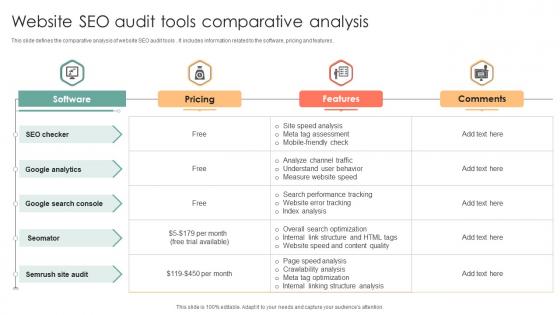
You can complete a useful first review with a combination of free tools. Availability and features may change, but common options include:
- Google Search Console: indexing, search performance and selected site issues.
- PageSpeed Insights: page performance data and improvement suggestions.
- Google Analytics: visitor behaviour, when correctly installed and configured.
- Browser inspection tools: useful for checking page titles, headings, links and mobile layouts.
- Free crawling tools: some offer limited checks for broken links, redirects and page metadata.
Use reputable tools and be cautious about entering sensitive information into services you do not know. A tool’s score is not the same as a search ranking, and a low score does not automatically mean that a page will perform poorly.
Prioritise issues by impact
An audit may produce a long list of recommendations. Start with issues that prevent important pages from being accessed or understood, such as accidental blocking, broken pages or missing content. Then work through improvements to page relevance, navigation, mobile usability and performance.
It can help to record each issue, the pages affected, the proposed action and its priority. After making changes, check the pages again and monitor relevant data over time. SEO results are not always immediate, and improvements should be assessed alongside other business measures.
What a free SEO audit cannot tell you
A free audit is a useful first step, but it is not a guarantee of better rankings. Automated checks may miss context, misunderstand how a site is intended to work or recommend changes that are not suitable. They also cannot reliably predict what competitors will do or how search results will change.
For a more complete review, consider the website’s goals, audience, industry and existing performance data. Specialist support may be worthwhile if your website has complex technical issues, has lost significant organic traffic or plays a central role in generating business.
Turn your audit into an action plan
The most useful free website SEO audit is one that leads to practical improvements. Check that search engines can access your key pages, make your content clear and helpful, fix navigation problems and improve the experience on mobile devices. Address the most important issues first, then review performance regularly.
With a structured approach, even a simple audit can give you a clearer picture of your website’s strengths and the next steps towards improving its organic search presence.
7 Essential Tips for a Free Website SEO Audit
- Use a trusted free SEO audit tool.
- Check for crawl errors and broken links.
- Review page titles and meta descriptions.
- Test your site on mobile devices.
- Check page speed and image sizes.
- Look for missing headings and alt text.
- Fix high-impact issues first.
Use a trusted free SEO audit tool.
Choose a trusted free SEO audit tool from a reputable provider to check for issues such as broken links, missing page titles, indexing problems and slow-loading pages. Before entering your website details, check the provider’s reputation and privacy policy, and treat its results as guidance rather than a definitive verdict: automated tools can miss context or flag changes that are not necessary.
Check for crawl errors and broken links.
Check your website for crawl errors and broken links, as these can prevent search engines from accessing important pages and frustrate visitors. Use Google Search Console or a website-crawling tool to identify pages that return errors, then fix the links, restore the missing pages or redirect them to relevant alternatives. Prioritise issues affecting key pages and check again after making changes.
Review page titles and meta descriptions.
Review the page titles and meta descriptions on your key pages as part of a free website SEO audit. Make sure each title clearly and accurately describes the page, and check for missing or duplicated titles. Write concise meta descriptions that summarise the page and give people a reason to visit. These descriptions may appear in search results, although search engines can choose to display different text. Keep both elements natural and useful for readers rather than simply adding keywords.
Test your site on mobile devices.
Test your website on mobile devices to make sure it is easy to use on a smaller screen. Check that text is readable without zooming, buttons and links are easy to tap, menus work properly and pages do not require sideways scrolling. A smooth mobile experience helps visitors find what they need and is an important part of a practical SEO review.
Check page speed and image sizes.
Check how quickly your key pages load, especially on mobile, as slow pages can frustrate visitors. Free tools such as Google PageSpeed Insights can help identify potential improvements. Pay particular attention to large images: resize them to the dimensions needed on your site, compress them and use an efficient format where appropriate. These straightforward changes can reduce page weight and make your website feel faster.
Look for missing headings and alt text.
Check key pages for a clear main heading and descriptive subheadings, which help visitors scan the content and understand its structure. Also review images for appropriate alternative text (alt text) so that meaningful visual information is available to people using screen readers and when images cannot load. Decorative images generally do not need descriptive alt text.
Fix high-impact issues first.
When carrying out a free website SEO audit, fix high-impact issues first. Start with problems that prevent search engines or visitors from accessing important pages, such as accidental indexing blocks, broken links or pages that fail to load. Then move on to improvements such as clearer page titles, more useful content and faster loading times. Prioritising the changes most likely to affect visibility and usability helps you make the best use of your time, rather than getting distracted by minor issues or tool scores.