Online Website Analysis: How to Understand and Improve Your Website
A website is often one of the first places people encounter a business. But how can you tell whether it is working as well as it could? Online website analysis helps answer that question by examining how a site performs, how easy it is to use and how effectively it supports its goals.
Whether you run an online shop, publish information or generate enquiries, regular analysis can reveal what is working and where improvements may be needed.
What is online website analysis?
Online website analysis is the process of assessing a website using data, technical checks and user feedback. It can cover many areas, including page speed, mobile usability, search visibility, accessibility, security and visitor behaviour.
The purpose is not simply to collect numbers. It is to understand what those numbers mean and use them to make practical improvements.
What does a website analysis examine?
Performance and loading speed
Slow pages can make it harder for visitors to find information or complete an action. Performance analysis looks at factors such as page load time, image sizes, scripts and server response. Improving speed can make a site feel more responsive, particularly on mobile connections.
Mobile usability
People browse on phones and tablets as well as desktop computers. A mobile review checks that content is readable, navigation is straightforward and interactive elements are easy to use on smaller screens.
Search engine optimisation
Search analysis considers how clearly a website communicates its content to search engines and visitors. It may review page titles, headings, internal links, metadata, indexability and the relevance of written content. These checks can identify opportunities to improve visibility in search results, although no analysis can guarantee specific rankings.
User experience and accessibility
A website should help visitors complete tasks without unnecessary effort. Reviewing navigation, page structure, forms and calls to action can highlight points of confusion. Accessibility checks can also identify barriers for people using assistive technology or alternative ways of navigating a site.
Content and conversion paths
Analysis can show whether pages answer visitors’ questions and guide them towards useful next steps, such as making an enquiry, booking a service or completing a purchase. Visitor behaviour data may help identify pages where people leave or forms they do not complete.
Technical health and security
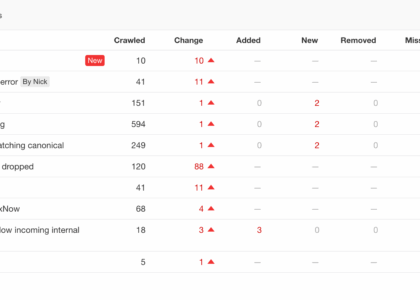
Technical checks can uncover broken links, redirect issues, missing pages and problems with how a site is crawled or displayed. Security reviews may look for outdated software, insecure connections and other common risks. More detailed security testing should be carried out by suitably qualified specialists.
How to analyse a website
- Set clear goals. Decide what the website should achieve, such as increasing enquiries, improving sales or helping visitors find information.
- Gather evidence. Use analytics, search performance data, technical testing tools and feedback from real users where possible.
- Review key pages. Examine important landing pages, service or product pages, forms and contact details.
- Identify issues and opportunities. Separate urgent problems from longer-term improvements, and consider how each issue affects visitors and business goals.
- Make changes and measure the results. Test improvements, allow time for reliable data to accumulate, and compare performance against a suitable baseline.
Choosing the right tools
Website analysis tools can help assess areas such as performance, search visibility, accessibility and visitor behaviour. Different tools measure different things, so results should be interpreted in context. Automated checks are useful for spotting potential problems, but they cannot always explain why visitors behave a certain way or whether a page is genuinely easy to use.
For a fuller picture, combine tool-based checks with manual review and, where appropriate, user testing. Always consider privacy requirements when collecting or using visitor data.
Common website analysis mistakes
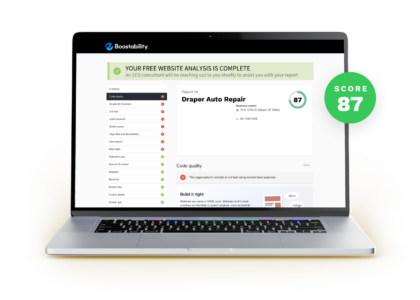
- Focusing on a single score: A score can be a useful indicator, but it does not capture every aspect of a website’s quality.
- Making changes without a clear goal: Improvements should be linked to visitor needs and measurable outcomes.
- Ignoring mobile visitors: A site that works well on a desktop may still be difficult to use on a phone.
- Chasing traffic alone: More visitors are not necessarily valuable if they cannot find what they need or take the intended action.
- Treating analysis as a one-off task: Websites, technology and visitor expectations change over time, so regular reviews are important.
Make analysis an ongoing process
Online website analysis is most effective when it becomes part of a continuous improvement cycle: set a goal, review the evidence, make a focused change and measure its impact. This approach helps businesses prioritise work, improve the visitor experience and make better-informed decisions about their websites.
A well-analysed website is not simply one that performs well in a test. It is one that helps people accomplish what they came to do—and helps the organisation achieve its objectives.
Essential FAQs on Online Website Analysis: Enhancing Performance and Conversions
- What is online website analysis?
- Why is website analysis important for my business?
- Which aspects of a website should I analyse?
- How can I analyse my website’s performance and loading speed?
- How do I check whether my website is mobile-friendly?
- Can website analysis help improve my search engine rankings?
- Which tools can I use to analyse a website?
- How often should I analyse my website?
- How can I use website analysis results to improve conversions?
What is online website analysis?
Online website analysis is the process of assessing a website’s performance, usability and overall effectiveness. It can include reviewing page speed, mobile compatibility, search visibility, accessibility, technical health and visitor behaviour. The findings help identify what is working well and where improvements could make the site easier to use and better aligned with its goals.
Why is website analysis important for my business?
Website analysis helps you understand how well your site serves your business and its visitors. By reviewing performance, usability, search visibility and visitor behaviour, you can spot issues, improve the customer experience and make it easier for people to take action—whether that means making an enquiry or completing a purchase. Regular analysis also helps you prioritise improvements based on evidence, rather than guesswork.
Which aspects of a website should I analyse?
When analysing a website, consider its loading speed and technical performance, mobile usability, accessibility, security and search engine optimisation. Review the quality and clarity of the content, how easy it is to navigate, and whether key pages guide visitors towards useful actions, such as making an enquiry or completing a purchase. Website analytics can also show how people find and use your site, where they leave and which pages perform best. Focus on the aspects most closely linked to your goals, then use the findings to prioritise practical improvements.
How can I analyse my website’s performance and loading speed?
To analyse your website’s performance and loading speed, use tools such as Google PageSpeed Insights, Lighthouse or WebPageTest to test key pages on both mobile and desktop. Review metrics including loading time, Core Web Vitals, server response and large images or scripts that may slow pages down. Run tests more than once, as results can vary with network conditions, and prioritise the issues these tools identify. After making changes, test again to check whether performance has improved for visitors.
How do I check whether my website is mobile-friendly?
To check whether your website is mobile-friendly, view it on several phones and tablets, and use your browser’s developer tools to preview different screen sizes. Check that text is easy to read without zooming, pages fit the screen without horizontal scrolling, menus and buttons are easy to tap, and forms work smoothly. You can also run a performance and usability check with tools such as Lighthouse or PageSpeed Insights, then test any recommended changes on real devices.
Can website analysis help improve my search engine rankings?
Yes. Website analysis can help identify issues that may affect search visibility, such as slow loading times, mobile usability problems, broken links, poor page structure or missing and unclear content. Addressing these issues can make your site easier for search engines to crawl and more useful for visitors, which may support improved rankings over time. However, analysis cannot guarantee higher positions, as search rankings depend on many factors and change regularly.
Which tools can I use to analyse a website?
You can analyse a website using tools such as Google Analytics 4 to understand visitor behaviour, Google Search Console to monitor search performance, and PageSpeed Insights to check loading speed and performance. Accessibility checkers and SEO audit tools can help identify other issues, while services such as uptime monitors can track availability. Each tool focuses on different aspects, so use a combination and treat automated results as useful indicators rather than a complete assessment.
How often should I analyse my website?
How often you should analyse your website depends on how frequently it changes and how important it is to your organisation. As a general guide, review key performance, traffic and conversion data monthly, and carry out a broader check of usability, search visibility, accessibility and technical health every three to six months. Analyse it sooner after a redesign, a major content update or a sudden change in traffic or enquiries. Regular reviews help you spot issues early and make improvements based on evidence.
How can I use website analysis results to improve conversions?
Use website analysis results to identify where visitors lose interest or struggle to complete an action, such as leaving a key page or abandoning a form. Prioritise issues that affect important conversion paths, then make focused improvements—for example, clarifying page content, simplifying navigation, improving mobile usability or making calls to action more visible. Test changes where possible and monitor conversion rates alongside relevant metrics, such as form completion or checkout abandonment, to see whether the improvements are working.