How to Check the SEO Optimisation of a Website
Checking your website’s search engine optimisation (SEO) helps you understand how easily people and search engines can find, access and use your pages. A regular review can uncover technical problems, improve the quality of your content and highlight opportunities to attract more relevant visitors.
You do not need to tackle everything at once. Start with the checks below, prioritise issues that affect important pages, and monitor the results over time.
Check whether your website is indexed
Search engines need to discover and index your pages before they can show them in search results. Search for site:yourdomain.co.uk in Google to get a quick indication of which pages are indexed. This is only a rough check, so use Google Search Console for more reliable information.
In Search Console, review the indexing report for pages that are excluded or have errors. Check that important pages are not blocked by your robots.txt file, marked with a noindex tag, or missing from your XML sitemap.
Review your technical SEO
Technical issues can prevent search engines from crawling your site or make it difficult for visitors to use. Check that:
- Your website uses HTTPS and displays a valid security certificate.
- Important pages load successfully and do not return errors such as 404 or 500.
- Your XML sitemap is up to date and submitted in Google Search Console.
- Your robots.txt file does not block pages you want search engines to find.
- There are no unnecessary redirects or redirect loops.
- Your preferred version of each page is clear, using redirects and canonical tags where appropriate.
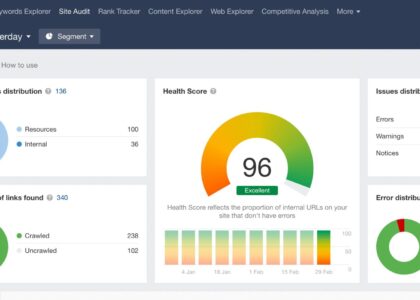
A website crawler can help you find broken links, duplicate page titles, missing metadata and other issues across many pages. For larger sites, crawling tools can make an audit much quicker than checking each page manually.
Check page speed and mobile usability
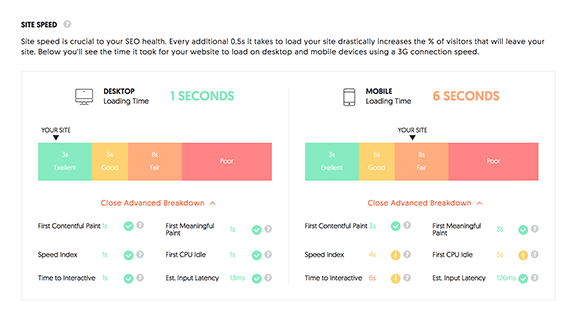
Pages that load slowly can frustrate visitors, particularly on mobile connections. Test key pages with Google PageSpeed Insights and review the recommendations. Common improvements include compressing images, reducing unnecessary scripts and using browser caching.
Also check that the site works well on a mobile phone. Text should be readable without zooming, buttons should be easy to tap, and visitors should not need to scroll horizontally to view the content.
Assess your page titles and meta descriptions
Each important page should have a unique, descriptive title that accurately reflects its content. Titles help search engines and users understand what a page is about, and they may appear as the headline in search results.
Meta descriptions should summarise the page and give people a useful reason to visit. They are not a guaranteed ranking factor, but clear descriptions can help searchers decide whether your result is relevant. Avoid repeating the same title or description across multiple pages.
Review your content and keywords
Good SEO content answers the questions your intended audience is asking. Check whether each page has a clear purpose, provides useful and accurate information, and uses natural language. Include relevant search terms where they genuinely fit, but avoid awkward repetition or writing primarily for search engines.
Look for pages that are out of date, too similar to one another or lacking useful detail. Consider updating, combining or redirecting weak pages rather than publishing more content without a clear purpose.
Check headings, links and images
Use headings to organise information so readers can scan a page. A clear main heading should describe the page, followed by relevant subheadings in a logical order.
Internal links help visitors and search engines discover related content. Link between relevant pages using clear anchor text, and fix links that lead to missing pages. For images, use descriptive file names and meaningful alternative text where the image conveys information. Compress image files to help pages load faster.
Measure search performance
Use Google Search Console to see which queries bring people to your website, which pages appear in search results and how often users click through. Analytics tools can provide further information about visits and on-site behaviour.
Look for changes over time rather than relying on a single day’s results. Rankings and traffic can vary, so compare similar periods and consider factors such as seasonality, website updates and changes in demand.
Create an SEO action plan
An SEO check is most useful when it leads to clear next steps. Record each issue, the pages affected, its likely impact and who will address it. Start with problems that stop important pages being crawled or used, then work through content and performance improvements.
Recheck your website regularly, particularly after a redesign, a major content update or a change to your website platform. SEO is an ongoing process: consistent improvements to accessibility, performance and content can help your website serve both visitors and search engines more effectively.
Top 6 Tips for Optimising Your Website’s SEO Effectively
- Check that every page has a unique title and meta description.
- Use clear headings that describe each page’s content.
- Make sure your website works well on mobile devices.
- Test page speed and compress large images.
- Fix broken links and add descriptive link text.
- Review your sitemap and check indexing in Google Search Console.
Check that every page has a unique title and meta description.
Check that every page on your website has a unique, descriptive title tag and meta description. The title should clearly reflect the page’s content, while the description should give searchers a helpful summary and encourage them to visit. Avoid duplicating or stuffing them with keywords, and keep both concise so they display clearly in search results.
Use clear headings that describe each page’s content.
Use clear, descriptive headings to show what each page is about and help visitors find the information they need. Organise headings in a logical order, with one main heading followed by relevant subheadings, and include natural, relevant keywords where they fit. This makes your content easier to scan and understand for both readers and search engines.
Make sure your website works well on mobile devices.
Make sure your website works smoothly on mobile devices, as many visitors will browse it on a phone or tablet. Check that pages load quickly, text is easy to read, menus are simple to use and buttons are large enough to tap comfortably. A mobile-friendly experience helps visitors find what they need and supports your website’s overall SEO performance.
Test page speed and compress large images.
Test your page speed to see how quickly your website loads on desktop and mobile. Slow pages can frustrate visitors, so compress large images to reduce file sizes without noticeably affecting quality. This can help pages load faster, improve the browsing experience and make your site easier to use on slower connections.
Fix broken links and add descriptive link text.
Fix broken links and use descriptive link text to make your website easier to navigate for visitors and search engines. Broken links can lead to frustrating dead ends, so check them regularly and update or remove any that no longer work. For working links, choose wording that clearly explains what the linked page is about, rather than relying on vague phrases such as “click here”.
Review your sitemap and check indexing in Google Search Console.
Review your XML sitemap to make sure it includes the important pages you want search engines to find and excludes outdated or irrelevant URLs. Submit the sitemap in Google Search Console, then check the indexing reports to see whether those pages have been discovered and indexed. If key pages are missing or showing errors, investigate issues such as blocked crawling, incorrect noindex tags or broken URLs, and request indexing after making any necessary fixes.