How to Use a Free SEO Analysis Website to Improve Your Website
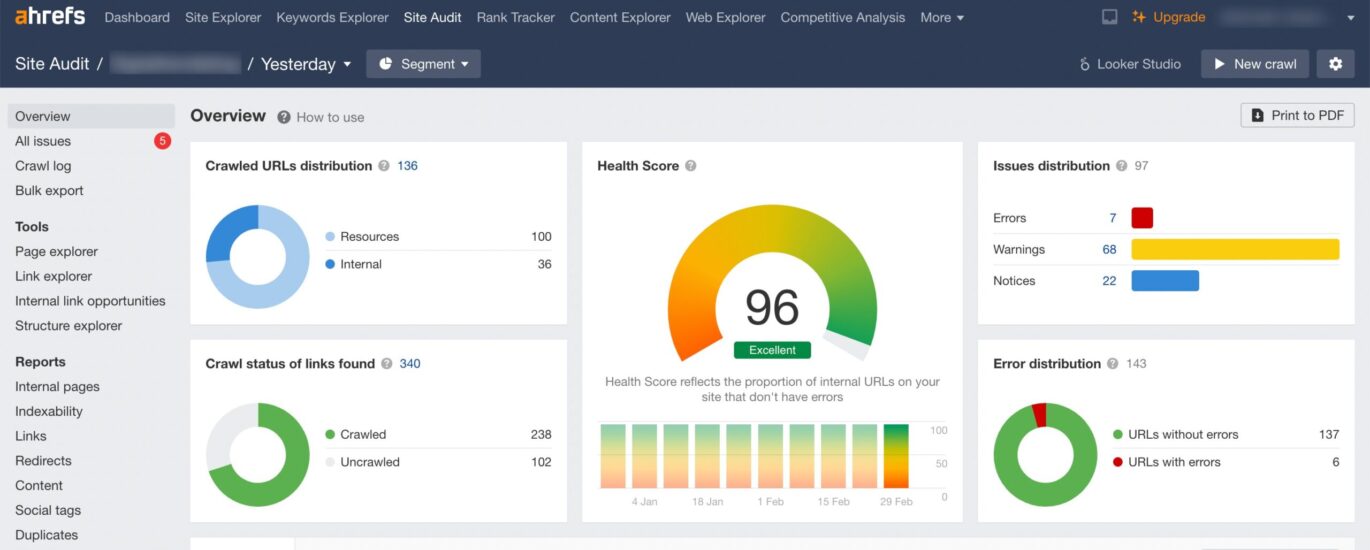
A free SEO analysis website can help reveal why a website is not attracting as much organic traffic as expected. These tools check common search engine optimisation (SEO) issues, such as missing page titles, slow loading times, broken links and pages that are difficult for search engines to understand.
A free report is a useful starting point, whether you run a small business website, an online shop or a blog. It can highlight areas to investigate and help you prioritise improvements. However, it is best treated as a guide rather than a complete SEO strategy.
What does a free SEO analysis website check?
Features vary between tools, but an SEO checker may review several aspects of a site:
- On-page SEO: page titles, meta descriptions, headings, image alt text and keyword relevance.
- Technical SEO: crawlability, mobile usability, HTTPS, broken links and sitemap availability.
- Performance: page loading speed and factors that may affect the visitor experience.
- Content: readability, page structure, duplicate content and whether a page appears to answer a searcher’s query.
- Backlinks: links from other websites that may help search engines assess a page’s authority.
Some services analyse a single URL, while others allow a limited number of pages or a whole domain to be checked. Free plans may also restrict the number of reports, keywords or competitor comparisons available.
How to get useful results
- Choose a trustworthy tool. Look for a clear explanation of what the checker measures and how it handles submitted website details.
- Enter the correct URL. Check the preferred version of the site, including the correct HTTPS and domain format.
- Review the recommendations. Separate important problems, such as blocked pages or broken links, from lower-priority suggestions.
- Check the affected pages yourself. An automated report may not understand the purpose or context of every page.
- Make changes gradually. Record what has been changed so that any effect on rankings, traffic or enquiries can be monitored.
Useful free SEO tools
A single free SEO analysis website may not provide a complete picture. It can be helpful to combine an audit with tools that provide data directly from search engines or measure specific aspects of a site. For example, Google Search Console reports on search visibility and indexing, while PageSpeed Insights assesses page performance. Bing Webmaster Tools can provide additional information about how pages appear in Bing search.
Availability and features can change, and some tools require website ownership verification. Always check the current terms and limits before relying on a particular service.
Understand the limits of free SEO analysis
A free SEO audit can identify technical warnings, but it cannot guarantee higher rankings. Search performance depends on many factors, including the usefulness of the content, the competitiveness of the search terms, the quality of a website’s links and the needs of its audience.
Automated checkers can also produce recommendations that need careful interpretation. For instance, a page may be flagged for a short amount of text even though it answers a simple question effectively. Adding content merely to satisfy a score can make a page less useful. Prioritise improvements that help visitors and make important information easier for search engines to find.
A practical SEO checklist
- Give each important page a clear, descriptive title.
- Write a useful meta description that accurately reflects the page.
- Organise content with logical headings.
- Make sure key pages can be accessed by search engines.
- Fix broken internal links and redirect URLs that have moved.
- Check that the website works well on mobile devices.
- Improve slow pages where possible, especially those visited by potential customers.
- Use clear, helpful content that addresses the reader’s needs.
- Track search impressions, visits and conversions over time.
Turn an SEO report into action
The best way to use a free SEO analysis website is to treat its findings as a prioritised to-do list. Start with issues that prevent important pages from being crawled or used properly. Then improve page titles, content structure, mobile usability and performance. Finally, use analytics and search performance data to assess whether the changes are making a difference.
Regular checks can help keep a website healthy, but SEO is an ongoing process rather than a one-off test. A free analysis is a practical first step: it can show where to look, while thoughtful improvements and consistent measurement help build lasting visibility in search results.
Top FAQs on Free SEO Analysis: Website Audits, Testing, and Optimisation
- How do I Analyse a website for SEO?
- How to do a free SEO audit?
- How can I test the SEO of a website for free?
- Is SEO Optimization free?
How do I Analyse a website for SEO?
To analyse a website for SEO, start by checking that important pages can be found and indexed by search engines, then review page titles, meta descriptions, headings, content, internal links and image alt text. Check for technical issues such as broken links, mobile usability, HTTPS and slow loading times. A free SEO analysis website can highlight potential problems, while tools such as Google Search Console can provide data about indexing and search performance. Prioritise fixes that improve the experience for visitors, and monitor results over time rather than relying on a single audit score.
How to do a free SEO audit?
To carry out a free SEO audit, enter your website address into a reputable free SEO analysis tool and review its report for issues such as missing page titles, broken links, mobile usability, page speed and indexing problems. You can supplement this with Google Search Console to check how Google finds and displays your pages. Prioritise fixes that affect important pages or make the site harder to use, then review your content and track results over time. Treat automated recommendations as a guide, as some findings need human judgement and an audit cannot guarantee higher rankings.
How can I test the SEO of a website for free?
You can test a website’s SEO for free by entering its URL into a free SEO analysis tool, which may check page titles, meta descriptions, headings, mobile usability, loading speed, broken links and whether search engines can crawl the site. For a fuller picture, use Google Search Console to review indexing and search performance, and PageSpeed Insights to assess page speed. Treat automated results as a starting point: check the recommendations yourself, prioritise issues that affect visitors or search visibility, and monitor changes over time.
Is SEO Optimization free?
SEO optimisation can be done for free using tools such as Google Search Console and by making improvements yourself, including refining page titles, improving content and fixing broken links. However, SEO takes time and expertise, so you may choose to pay for professional support or premium tools. You do not pay search engines for organic rankings, but ongoing work may involve costs.